With the widget ePost SmartSend, you can send letters and invoices, reaching your recipient customers through the most popular channels: ePost app, eBill, and physical mail. The postal service handles the entire processing and delivery of your shipments.
Step 1: Register your company with ePost
Step 2: Verify your company
After a successful login, you will be directed to the overview page, from where you can directly access ePost SmartSend. If your company address has not yet been verified, you must first verify your address by clicking the button “Verify company”.
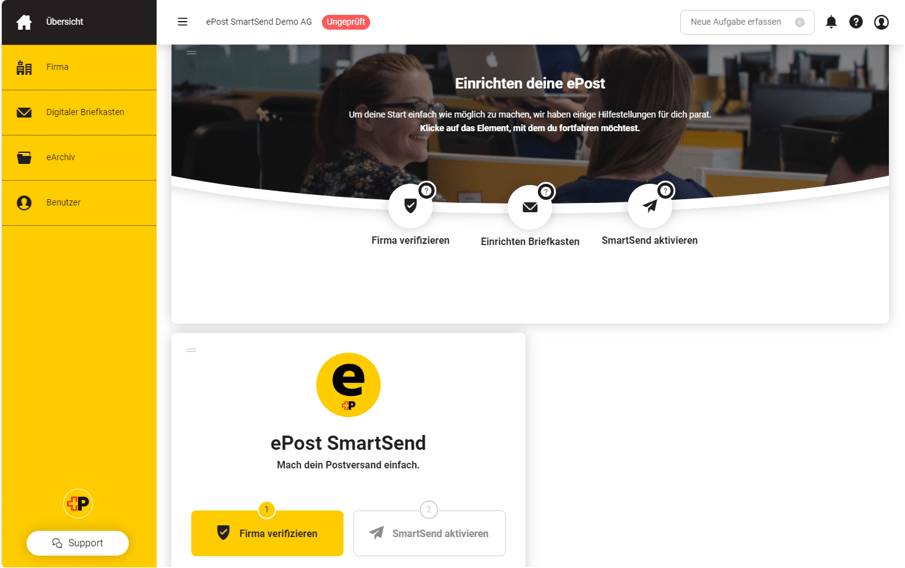
For the verification of your company address, we will send you a physical letter with an activation code. Please note that it may take a few days for the code to arrive. As long as your address is not verified, you will see the status “Verification pending” on your overview page.
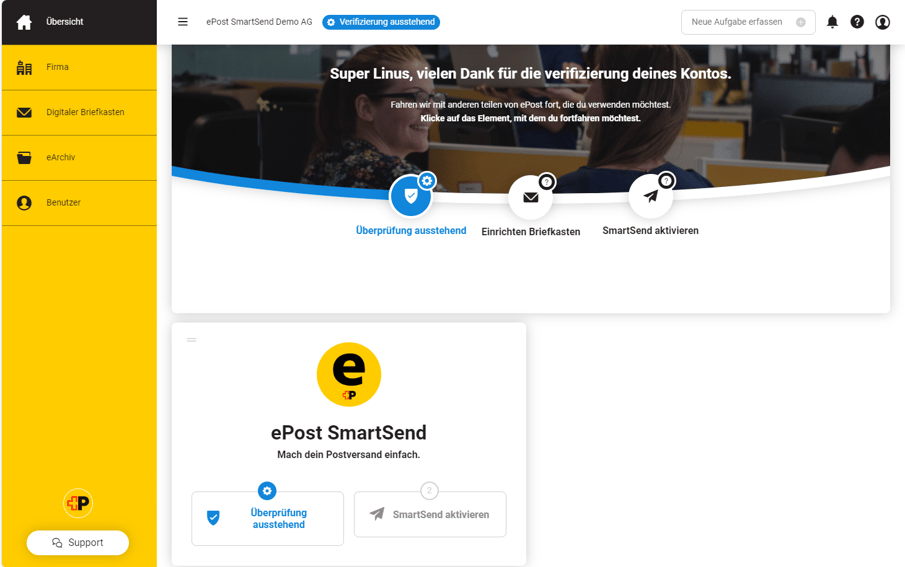
Once you have received the code by post, log in to ePost again. Then click on the button “Verification pending” to enter the activation code and gain access to ePost SmartSend.
Step 3: Activate the widget ePost SmartSend:
To use ePost SmartSend, you need to activate the corresponding widget once. Click the button “Activate SmartSend” for this.
You will now be redirected to the widget store where you can subscribe to the ePost SmartSend widget free of charge. Once the widget is activated, the button “Open SmartSend” will appear on your overview page.
-2.png?width=905&height=644&name=MicrosoftTeams-image%20(2)-2.png)
You can now access ePost SmartSend at any time via this link or via https://client.epost.ch/.
You are now ready to send your first letters and invoices via ePost SmartSend!